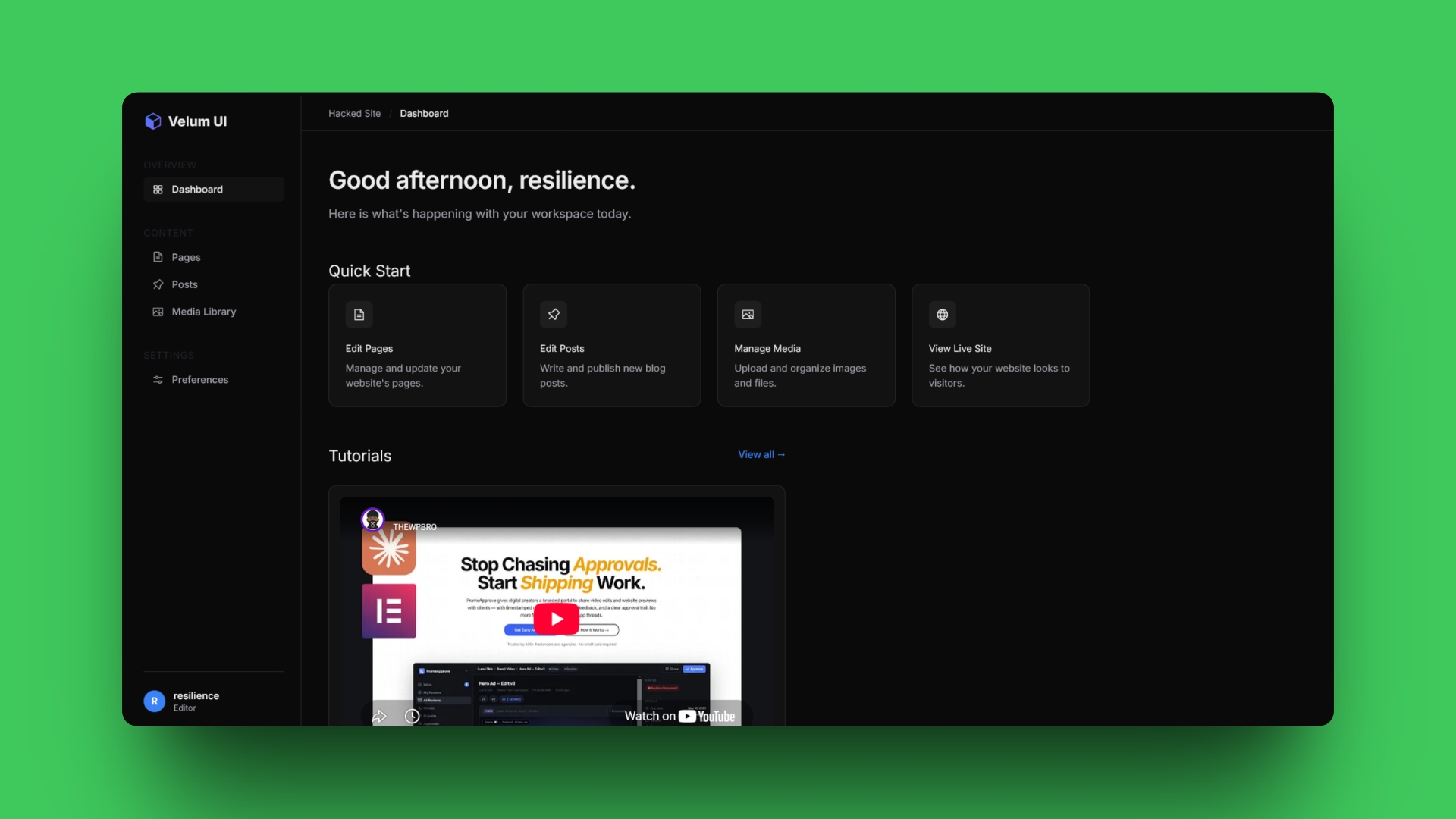
If you build websites for clients, you know the default WordPress dashboard can be overwhelming. There are too many menus, too many update notifications, and it just doesn't look like a premium product.
What if you could completely replace it with a sleek, dark-mode, SaaS-style interface? And what if you could do it without writing a single line of code yourself?
In my latest video, I demonstrated how to use Google Antigravity 2.0 to generate a custom WordPress dashboard plugin from scratch using just one single prompt. But more importantly, I showed you how to do it securely.
The Safe "Air-Gapped" AI Workflow
Many developers are (rightfully) terrified of giving an AI autonomous access to their live servers. What if it accidentally deletes the database? What if it overwrites wp-config.php?
The solution is an isolated, local-to-FTP workflow:
1. Keep it Local: Create an empty folder on your PC (e.g., Velum UI Plugin) and set it as your Project Folder in Antigravity.
2. Real-time Auditing: Paste your prompt into Antigravity and open VSCode right next to it. As the AI writes the PHP and CSS files locally, you can watch the code appear line-by-line and review it immediately. No copy-pasting required.
3. Safe Installation: Once the files are generated, simply zip the local folder, head over to your WordPress Admin panel, and install it via the standard plugin uploader.
4. Secure Iteration: If you ever need to tweak the design, ask the AI to update the local files. Verify the changes in VSCode, then use an FTP client like FileZilla to drag-and-drop only the updated file directly to your live server.
Total speed, zero risk.
The Master Prompt
Want to try this yourself? Below is the exact "Master Prompt" I used in the video. It instructs the AI on the precise hooks needed to hide the native WordPress menus, forces the dashboard columns to go full-screen, and injects a modern Tailwind-inspired design system.
Just copy the text below and paste it into Antigravity, Claude, ChatGPT, or Gemini:
Act as an expert PHP and WordPress developer. I need you to build a lightweight, object-oriented WordPress plugin named "Velum UI - Minimal Client Dashboard & Menu Hider".

Output the complete, production-ready code for exactly TWO files.

File 1: velum-ui.php
Include standard WordPress plugin headers (Plugin Name: Velum UI - Minimal Client Dashboard & Menu Hider, Author: YourName, Version: 1.0.0, Text Domain: velum-ui). Add the absolute path security check: defined( 'ABSPATH' ) || exit;

CRITICAL WORDPRESS LIFECYCLE RULE: Do not run current_user_can() in the global scope or inside a class constructor. Place the ! current_user_can( 'manage_options' ) check strictly inside the callback functions for your hooks. All hooks and functionality described below should ONLY apply to non-admin users.

Hooks & Logic:

Hook into admin_enqueue_scripts to load assets/admin-style.css.
Hook into admin_head (priority 1) to inject the Phosphor Icons script: <script src="https://unpkg.com/@phosphor-icons/web"></script>.
Hook into admin_menu (priority 999) to hide Plugins, Settings, Tools, Themes, and Elementor using remove_menu_page().
Hook into admin_head (priority 1) to hide update and maintenance nags using remove_action and inline CSS.
Hook into wp_dashboard_setup (priority 999). Inside the callback, clear the global $wp_meta_boxes['dashboard'] array to destroy all native and third-party widgets. Then, use wp_add_dashboard_widget() to create a single custom widget titled "Dashboard".
Widget HTML Structure: Inside the custom widget callback, output a full-screen app layout (.velum-app-layout) containing:

Mobile Header: A hidden-by-default top bar containing a gradient cube logo (using Phosphor icons) and a hamburger menu toggle button.
Custom Sidebar: A fixed width (256px) sidebar containing sections for "Overview", "Content", and "Settings". Use Phosphor icons for the links (e.g., ph-squares-four, ph-file-text, ph-sliders-horizontal). At the bottom, include a dynamic user profile block fetching the user's first initial, display name, and role.
Main Content Wrapper:
Sticky Top Header: A translucent, backdrop-blurred header containing simple breadcrumbs (e.g., "Site Name / Dashboard").
Greeting: A dynamic, time-aware greeting (e.g., "Good afternoon, {username}.") and a subtitle.
Quick Start: A CSS grid containing 4 cards (Edit Pages, Edit Posts, Manage Media, View Live Site). Inside each card, include a Phosphor icon inside an icon wrapper, a bold title, a grey description, and a top-right arrow (ph-arrow-up-right) that appears on hover.
Tutorials: A section constrained to a max-width of 42rem (approx 672px). Inside, embed a YouTube iframe (https://www.youtube.com/embed/4S_vjTW59-w?rel=0) inside a padded card wrapper that uses padding-bottom: 56.25% to maintain a responsive 16:9 aspect ratio.
JavaScript: An inline <script> at the very bottom of the widget that adds a click event listener to the hamburger menu button to toggle a velum-sidebar-open class on the sidebar.
File 2: assets/admin-style.css
Write CSS to create a premium, modern SaaS dark-mode interface.

Design Tokens:

Font: Import Google Font "Inter" and use it as the base font.
Background: #0a0a0a
Surfaces (Cards/Inputs): #121212
Surface Hover: #1a1a1a
Borders: #27272a
Text Primary: #ededed
Text Muted: #a1a1aa
Accent (Blue): #3b82f6
Full-Screen WordPress Overrides (CRITICAL): Force the dashboard to act like a standalone web app. For body.index-php, #wpbody, #wpcontent, #wpbody-content, .wrap, and #dashboard-widgets-wrap, apply background-color: #0a0a0a !important;, padding: 0 !important;, and margin: 0 !important;. Hide #screen-meta-links, .wrap > h1, #adminmenumain, #adminmenuwrap, and #wpfooter. Force the first dashboard column (#dashboard-widgets .postbox-container) to be width: 100% !important; and display: block !important;, and completely hide #postbox-container-2, 3, and 4. Clear all default paddings, margins, borders, and box-shadows on our custom widget box.

Layout Mechanics:

Desktop Layout: Set .velum-app-layout to height: calc(100vh - 32px); overflow: hidden; display: flex;. The main content area should have overflow-y: auto; to scroll independently.
Scrollbars: Override webkit scrollbars to match the dark theme (thumb: #27272a, track: #0a0a0a).
Hover States: When a .velum-card is hovered, transition the background to #1a1a1a, the border to #3b82f6, turn the title text to #3b82f6, scale up the icon wrapper slightly, and fade in the top-right arrow icon. Use !important on text colors in the cards to prevent WordPress from applying its default link colors.
Responsive Breakpoints:

<=1024px: Change the Quick Start grid to 2 columns.
<=768px: Make the mobile header visible. Hide the sidebar by default and display it only when the .velum-sidebar-open class is toggled. Change .velum-app-layout to flex-direction: column; height: auto; min-height: calc(100vh - 46px); overflow: visible;. Change the Quick Start grid to 1 column. Hide the sticky top header.
<=480px: Scale down the greeting font sizes and reduce internal card padding for compact viewing.
Final Thoughts
Using AI to build client dashboards is a game changer for WordPress agencies. You don't need to bloat your site with heavy page builder plugins just to make the backend look nice. With the right prompt and a secure workflow, you can generate pixel-perfect UI plugins in under two minutes.
If you found this useful, let me know what plugin you want to see built next in the comments!
Want to get the polished version when I'm done?
Join the waitlist
Enter your email to be notified when I finally release the finished version
Check your inbox!
We just sent you a confirmation email.
Please click the link inside to confirm.